Enter your activation code and the email address that should receive TagLink messages.
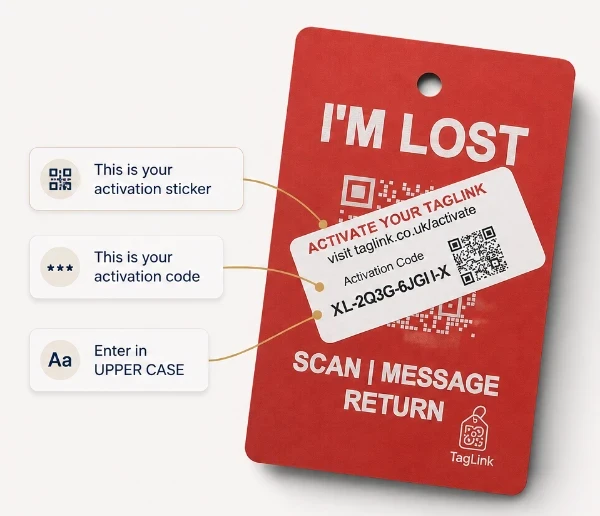
Activating a TagLink Connect?
TagLink Connect should be activated by the adult whose email address should receive messages. This may be the wearer, a parent, guardian, family member, carer or another trusted contact.
If the wearer is under 18, TagLink Connect must be activated and managed by their parent or legal guardian, or another responsible adult authorised by their parent or legal guardian. Use the adult trusted contact’s email address, not the child’s email address.
Only the trusted contact’s email address and activation code are required. Providing a contact name is optional. TagLink does not require the child’s name or contact details.
What happens next?
If your activation code is valid and your TagLink has not already been activated, we’ll email you to confirm it’s active. If you don’t receive a confirmation email, please check your activation code and try again.
Already activated or need to update your details?
Contact TagLink Support.
By activating a TagLink, you agree to our Terms of Use and acknowledge our Privacy Policy and Data & Safeguarding information.
Having trouble? Contact the TagLink team for help.
Your contact details are not displayed publicly.
Enter your activation code and the email address that should receive TagLink messages.
Activating a TagLink Connect?
TagLink Connect should be activated by the adult whose email address should receive messages. This may be the wearer, a parent, guardian, family member, carer or another trusted contact.
If the wearer is under 18, TagLink Connect must be activated and managed by their parent or legal guardian, or another responsible adult authorised by their parent or legal guardian. Use the adult trusted contact’s email address, not the child’s email address.
Only the trusted contact’s email address and activation code are required. Providing a contact name is optional. TagLink does not require the child’s name or contact details.
What happens next?
If your activation code is valid and your TagLink has not already been activated, we’ll email you to confirm it’s active. If you don’t receive a confirmation email, please check your activation code and try again.
Already activated or need to update your details?
Contact TagLink Support.
By activating a TagLink, you agree to our Terms of Use and acknowledge our Privacy Policy and Data & Safeguarding information.
Having trouble? Contact the TagLink team for help.
Your contact details are not displayed publicly.
Frequently asked questions
Answers to common TagLink questions.
What is TagLink and how does it work?
Every TagLink carries a unique QR code connected to a chosen contact. When somebody scans it, they can send a secure message through TagLink without being shown the chosen contact’s personal details.
Does the person scanning need an app or account?
No. They simply scan the QR code using their smartphone camera. There is no app to download and no account to create.
Are my personal contact details displayed?
No. Your personal details always remain private. The person scanning contacts you through a secure TagLink message.
Is there a subscription?
No. TagLink has no monthly or annual subscription. Once activated, your TagLink is ready to use.
Does TagLink provide location tracking?
No. TagLink does not provide GPS or live location tracking. It provides a way for somebody scanning the QR code to send a secure message to the chosen contact.
What happens when somebody scans my TagLink?
They are taken to a secure page where they can send a message about the item or situation. The chosen contact receives an email notification and can respond appropriately.
Frequently asked questions
Answers to common TagLink questions.
What is TagLink and how does it work?
Every TagLink carries a unique QR code connected to a chosen contact. When somebody scans it, they can send a secure message through TagLink without being shown the chosen contact’s personal details.
Does the person scanning need an app or account?
No. They simply scan the QR code using their smartphone camera. There is no app to download and no account to create.
Are my personal contact details displayed?
No. Your personal details always remain private. The person scanning contacts you through a secure TagLink message.
Is there a subscription?
No. TagLink has no monthly or annual subscription. Once activated, your TagLink is ready to use.
Does TagLink provide location tracking?
No. TagLink does not provide GPS or live location tracking. It provides a way for somebody scanning the QR code to send a secure message to the chosen contact.
What happens when somebody scans my TagLink?
They are taken to a secure page where they can send a message about the item or situation. The chosen contact receives an email notification and can respond appropriately.
TagLink®
Helping lost items
find their way back.

TagLink® by Orange Feather Ltd | Registered in England & Wales No. 14263776 | Lightwater, Surrey | +44 7359 916345
TagLink™
Helping lost items
find their way back.
Activate your TagLink
taglink.co.uk/activate
Need help? hello@taglink.co.uk
TagLink™ by Orange Feather Ltd
Registered in England & Wales No. 14263776
Lightwater, Surrey | +44 7359 916345
TagLink™
Helping lost items
find their way back.
TagLink™ by Orange Feather Ltd | Registered in England & Wales No. 14263776 | Lightwater, Surrey | +44 7359 916345